Friday, October 4, 2013

vodafone internet settings for android


APN settings explained
APN (Access Point Name) settings are used by your phone, tablet or modem to connect to the internet, and send/receive PXT messages, over the Vodafone mobile network. Below you’ll find APN, WAP and PXT/MMS settings for your phone.

APN settings
Internet settings for smartphones
Name
VF WEB
APN
live.vodafone.com
MCC
505
MNC
03
APN Type
default
Note: Your phone may not require the MCC, MNC or APN Type 

Internet settings for WAP-based phones (i.e. non-smartphones)
Name   
VF WAP
APN
live.vodafone.com
Proxy
10.202.2.60
Port
8080
Note: Your phone may not require the MCC, MNC or APN Type 

PXT/MMS settings
Name
Vodafone AU-MMS
APN
live.vodafone.com
MMSC
http://pxt.vodafone.net.au/pxtsend
MMS Proxy
10.202.2.60
MMS Port
8080
MCC
505
MNC
03
APN type
mms
Note: Your phone may not require the MCC, MNC or APN Type 

Thursday, October 3, 2013

Manual Internet Settings for Omantel, Nawras Blackberry


Internet settings (iPhone – Nawras)
Go to Settings > General > Network > Cellular Data NetworkEnter Cellular
Data Apn : isp.nawras.com.om
Username : testTest : test

Internet settings (iPhone – Oman Mobile)
Goto > > > Apn : taif
Username : taif
Password : taif

Internet settings – Blackberry – Nawras
Go to Options > Advanced >
TCPAPN : isp.nawras.com.om
username : testpassword : test

MMS settings – Nawras
APN : mms.nawras.com.om
MMSC : 10.128.240.16/servlets/mms
MMS Proxy : 10.128.240.19:8080
All other fields blank

MMS settings – Oman Mobile
APN : mms
Username: mms
Password: mms
Mmsc: http://mmsc.omanmobile.om:10021/mmsc
Proxy: 192.168.203.035:8080
All other fields blank

Text Message Center Number
Go to Menu > messages > settings > text message > message centre
OmanMobile (+968 99300610)

Internet settings – Google Nexus One – Nawras
Go to seetings >Mobile networks > Access Point Names> Data
APNName: Nawras Internet (can be any name)
APN: isp.nawras.com.om
APN Type: default
User Name: test
Password: test
APN Type: defaultLeave other fields empty
MMS settings – Google Nexus One – Nawras
MMS APNName: nawras
MMS (Can be any name)
APN: mms.nawras.com.om
Proxy: 10.128.240.19Port: 8080
username: test
password: test
MMSC: http://10.128.240.16/servlets/mms
MMS proxy: 10.128.240.19MMS port: 8080
Authentication Type : None
APN type: mms

Internet Settings for Globe, Smart, Sun

GLOBE

myGlobe:
access name: www.globe.com.ph
auth type: PAP
proxy address: 203.177.42.214:8080
linger time (sec): 300

myGlobe MMS:
access name: mms.globe.com.ph
auth type: PAP
proxy address: 203.177.42.214:8080
linger time (sec): 300

MyGlobe Internet Postpaid:
access name: internet.globe.com.ph
auth type: PAP
proxy address: 0.0.0.0:8080
linger time (sec): 300

MyGlobe Internet Prepaid:
access name: http.globe.com.ph
auth type: PAP
proxy address: 0.0.0.0:8080
linger time (sec): 300

MyGlobe Youtube:
access name: internet.globe.com.ph
auth type: PAP
proxy address: 0.0.0.0:8080
linger time (sec): 300

MyGlobe Stream:
access name: real.globe.com.ph
auth type: PAP
home url: http://
proxy address: 0.0.0.0:8080
linger time (sec): 300


SMART

SmartGPRS:
accessname: internet
auth type: PAP
proxy address: 10.102.61.46:8080
linger time (sec): 300

SmartMMS:
accessname: mms
auth type: PAP
proxy address: 10.102.61.46:8080
linger time (sec): 300


Smart INTERNET:
accessname: internet
auth type: PAP
proxy address: 0.0.0.0:8080
linger time (sec): 300


Internet settings for SUN users...

By Andreile Espinosa in SAMSUNG CORBY 2 - GT-S3850 - CORBITONIANS! · Edit Doc · Delete
MENU > SETTINGS > CONNECTIVITY > NETWORK > CONNECTIONS > PRESS YES (POP-UP MESSAGE) > CREATE
SUN MMS:
Set Name: SUN MMS
Access Name: mms
Auth type: PAP
User ID: 
Password: 
Protocol: HTTP
Proxy address: 202.138.159.78:8080
Linger Time(sec): 300
SUN WAP GPRS
Set name: SUN WAP GPRS
Access name: wap
Auth type:PAPUser ID: Password:
 Protocol: HTTP
Linger Time (sec): 300
Sun Internet
Set name: SUN INTERNET
Access name: minternet
Auth type: PAP
User ID:
 Password:
 Protocol: HTTP
Proxy Address: http://0.0.0.0:8080
Linger Time (sec): 300


Monday, September 16, 2013

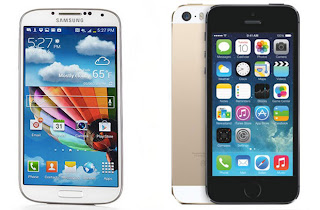
iPhone 5s vs Galaxy S4: What to buy
iPhone 5s vs Galaxy S4: What to buy


During the launch event for the iphone 5s, Apple CEO, Apple CEO Tim Cook told the crowd that “we don’t pack in feature after feature.” That was obviously a dig at Samsung, whose Galaxy S4 will be competing head to head starting Sept. 20. Not sure which smartphone to buy? You will make up your mind by the end of this article.


The iPhone 5s is all about enhancing an already great phone, from a faster A7 processor and beefed-up camera to a new fingerprint sensor. On the other hand, the Galaxy S4 pushes the envelope with a cornucopia of features and some impressive specs of its own. Here’s how the two flagship smartphones stack up in multiple categories.


Why do Apple releases generate so much hype?

Design

Apple knows how to make more beautiful and solidly built smartphones than Samsung, and that doesn’t change with the iPhone 5s. Now available in three color options: space gray, gold and silver, the 5s is just as light (3.9 ounces) and thin (.3 inches) as before while packing a lot more power. The gold version looks classy without being ostentatious. The edges still look great and have a premium vibe.


Meanwhile, the Galaxy S4 is an uninspired plastic slab. Yes, it’s light for having a larger 5-inch display, but the S4 doesn’t have a top-tier look or feel like the iPhone 5s. What we do like about the S4 is that the back is removable, allowing you to access the memory card slot and replace the battery. Samsung mixes a physical home button with capacitive keys beneath the screen, which works but doesn't feel unified. 
iPhone 5s. The iPhone 5 had a better design, and now you get more color options with the 5s.
There’s something that feels dated about the iPhone 5s’ 4-inch screen. At 1136 x 640 pixels, Apple’s device has a much lower resolution than the S4’s 1920 x 1080 pixels.
The S4 also has a full inch on the iPhone at 5 versus 4 inches. That’s a lot more room for watching videos, surfing the Web and playing games.


On the plus side for iPhone fans, assuming Apple choose the same panel for the 5s, it should be brighter than the S4. Just like the iPhone 5, we expect this screen to be much easier to read outdoors.
Apple also leads when it comes to design, with its sharp features; stainless steel rims. Apple has a new addition; finger print detection security feature.
Galaxy S4’s bigger and sharper screen in the Samsung outweighs the iPhone 5’s brighter LCD.
Cameras
The iPhone has always had one of the best smartphone cameras, and Apple is hoping to keep that primacy. While the 5s still bears an 8-megapixel camera, Apple’s new f/2.2 aperture sensor is 15 percent larger than the previous one, it can therefore capture wider frames, and a redesigned flash can blend its two LED lights to preserve a scene’s natural color balance. Apple has paired the hardware with a series of software features, adding things like a 28-megapixel panorama creator and a “burst mode” that captures a series of pictures and picks the best one. Apple may not be emphasizing camera quality quite as heavily as competitors. Samsung Galaxy S4 has 13-megapixel camera. 


Tuesday, September 10, 2013

How to Lock Folder without software

Here you learn how to lock folder without software


Steps 1) 
              
Go to my computer than Local Disk C or Local disk D where 
you want to create folder example folder name “text”

Step 2)               

Now go to start run type “CMD” click ok than your folder example 
in D drive

Step 3)

Type ‘’CLS’’ than d: enter

Step 4)  

“cacls test /p everyone:n”  press enter are you sure press (y) now 
folder already lock For unlock folder you have to type

Step 5)

“cacls test /p everyone:f” press enter are you sure press (y)


Monday, September 9, 2013

How to downgrade win xp sp3 to sp2

How to downgrade windows xp sp3 to sp2 get windows xp sp2 CD and repair your computer with windows xp sp2 and you can use sp3 product key which is already install in your computer after repair you check its already sp2