Tuesday, October 1, 2013

Monday, September 16, 2013
iPhone 5s vs Galaxy S4: What to buy
iPhone 5s vs Galaxy S4: What to buy
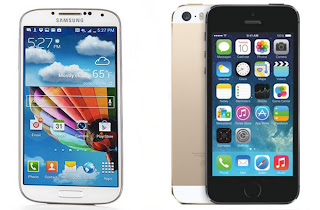

During the launch event for the iphone 5s, Apple CEO, Apple
CEO Tim Cook told the crowd that “we don’t pack in feature after feature.” That
was obviously a dig at Samsung, whose Galaxy S4 will be competing head to
head starting Sept. 20. Not sure which smartphone to buy? You will make up your
mind by the end of this article.

The iPhone 5s is all about enhancing an already great phone,
from a faster A7 processor and beefed-up camera to a new fingerprint sensor. On
the other hand, the Galaxy S4 pushes the envelope with a cornucopia of features
and some impressive specs of its own. Here’s how the two flagship smartphones
stack up in multiple categories.

Why do Apple releases generate so much hype?
Design
Apple knows how to make more beautiful and solidly built
smartphones than Samsung, and that doesn’t change with the iPhone 5s. Now
available in three color options: space gray, gold and silver, the 5s is just
as light (3.9 ounces) and thin (.3 inches) as before while packing a lot more
power. The gold version looks classy without being ostentatious. The edges still
look great and have a premium vibe.

Meanwhile, the Galaxy S4 is an uninspired plastic slab. Yes,
it’s light for having a larger 5-inch display, but the S4 doesn’t have a
top-tier look or feel like the iPhone 5s. What we do like about the S4 is that
the back is removable, allowing you to access the memory card slot and replace
the battery. Samsung mixes a physical home button with capacitive keys beneath
the screen, which works but doesn't feel unified.
iPhone 5s. The iPhone 5 had a better design, and now you get
more color options with the 5s.
There’s something that feels dated about the iPhone 5s’
4-inch screen. At 1136 x 640 pixels, Apple’s device has a much lower resolution
than the S4’s 1920 x 1080 pixels.
The S4 also has a full inch on the iPhone at 5 versus 4
inches. That’s a lot more room for watching videos, surfing the Web and playing
games.

On the plus side for iPhone fans, assuming Apple choose the
same panel for the 5s, it should be brighter than the S4. Just like the iPhone
5, we expect this screen to be much easier to read outdoors.
Apple also leads when it comes to design, with its sharp
features; stainless steel rims. Apple has a new addition; finger print
detection security feature.
Galaxy S4’s bigger and sharper screen in the Samsung outweighs
the iPhone 5’s brighter LCD.
Cameras
The iPhone has always had one of the best smartphone
cameras, and Apple is hoping to keep that primacy. While the 5s still
bears an 8-megapixel camera, Apple’s new f/2.2 aperture sensor is 15 percent
larger than the previous one, it can therefore capture wider frames, and a
redesigned flash can blend its two LED lights to preserve a scene’s natural
color balance. Apple has paired the hardware with a series of software
features, adding things like a 28-megapixel panorama creator and a “burst mode”
that captures a series of pictures and picks the best one. Apple may not be
emphasizing camera quality quite as heavily as competitors. Samsung Galaxy S4
has 13-megapixel camera.
Tuesday, September 10, 2013
How to Lock Folder without software
Here you learn how to lock folder without software
Steps 1)
Go to my computer than Local Disk C or Local disk D
where
you want to create folder example folder name “text”
Step 2)
Now go to start run type “CMD” click ok than your folder
example
in D drive
Step 3)
Type ‘’CLS’’ than d: enter
Step 4)
“cacls test /p everyone:n” press enter are you sure
press (y) now
folder already lock For unlock folder you have to type
Step 5)
“cacls test /p everyone:f” press enter are you sure press
(y)
Monday, September 9, 2013
How to downgrade win xp sp3 to sp2
How to downgrade windows xp sp3 to sp2 get
windows xp sp2 CD and repair your computer with windows xp sp2 and you can use
sp3 product key which is already install in your computer after repair you check its already sp2
Sunday, September 8, 2013
How to do a factory reset on the Nokia N8

Follow these simple steps to perform a factory reset on the
Nokia N8:
1. Go into the Nokia N8’s Main Menu
2. Select, Settings
3. Then go into Phone
4. Scroll down to Phone mgmt.
5. Select Factory Settings
6. Now you’ll be presented with two options: restore and delete
data and restore.
7. Select Delete Data and Restore
8. The phone will now reset and all the data will be wiped
Saturday, September 7, 2013
Sunday, August 25, 2013
How to share my iPhone 3GS Internet connection with a computer
1. Connect the Apple iPhone 3GS to the computer using the USB cable.

2. Touch Settings.

3. Touch General.

4. Touch Cellular.

5. Scroll to and touch Set Up Personal Hotspot

6. Touch Personal Hotspot.

7. If you see this screen, touch USB Only.

8. The Apple iPhone 3GS is now tethered.

9. On the computer, wait for the device drivers to install then click Home network.

10. Wait while the computer automatically applies the settings and connects to the network.

11. Setup is complete. Click Close.

enjoy with your iphone internet
Subscribe to:
Posts (Atom)